

Technology upgrades are a normal part of running a modern business. Servers are replaced, computers are refreshed, and storage devices eventually reach the end of their useful life. But when equipment is retired, many organizations overlook an important question:
How should old IT equipment be disposed of securely?
Improper disposal of computers, servers, and storage devices can expose sensitive business data, create compliance risks, and result in valuable hardware being wasted instead of recovered. By following the right process, businesses can protect their information, maintain accountability, and ensure retired equipment is handled responsibly.
In this guide, we’ll explain how businesses should dispose of old IT equipment securely and what steps are involved in responsible IT asset management.
Why Proper IT Equipment Disposal Matters
Many devices store sensitive data long after they are no longer in use. Even when files are deleted, information can often still be recovered if drives are not properly sanitized or destroyed.
Old IT equipment may contain:
- Customer information
- Financial records
- Internal company data
- Login credentials or network configurations
- Proprietary business information
If these devices are discarded improperly, the data may still be accessible. This can create security risks and reputational damage for businesses.
In addition to security concerns, organizations must also consider:
- Environmental responsibility
- Equipment tracking and documentation
- Asset value recovery
- Responsible recycling of electronics
A structured approach to IT equipment disposal helps address each of these concerns.
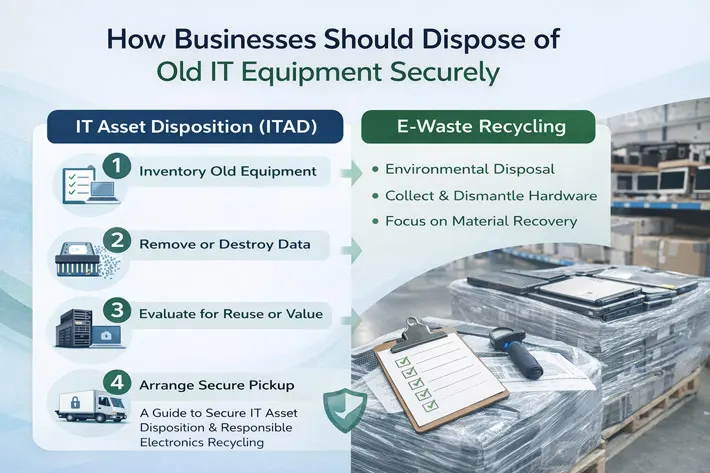
Step 1: Inventory and Identify Retired Equipment
The first step in disposing of old IT equipment is understanding what devices are being retired.
Businesses should create an inventory that includes:
- Computers and laptops
- Servers and networking hardware
- Storage devices and hard drives
- Backup equipment
- Monitors and peripherals
Documenting these assets helps maintain accountability and ensures that no equipment containing sensitive information is overlooked.
Inventory records also help organizations track which devices were processed and how they were handled during disposal.
Step 2: Securely Remove or Destroy Data
Before any device leaves a facility, businesses should ensure that all data is securely removed or destroyed.
This process is known as data sanitization and may include several methods:
Data Wiping
Software-based wiping tools overwrite data multiple times to ensure information cannot be recovered.
Physical Destruction
Hard drives and other storage devices may be physically destroyed using methods such as:
- Hard drive shredding
- Drilling through drive platters
- Crushing or dismantling storage media
Physical destruction ensures that data stored on a device cannot be accessed again.
For organizations handling sensitive information, proper data destruction is one of the most important steps in the disposal process.
Step 3: Evaluate Equipment for Reuse or Value Recovery
Not all retired IT equipment needs to be recycled immediately.
Many devices still have remarketing or resale value, especially enterprise hardware such as:
- Servers
- Networking equipment
- Storage systems
- Business-grade laptops and desktops
IT asset disposition services often evaluate equipment to determine whether it can be:
- Refurbished
- Resold
- Repurposed internally
Recovering value from retired equipment helps businesses offset technology upgrade costs while extending the lifecycle of usable hardware.
Step 4: Arrange Secure Pickup and Logistics
Transporting retired equipment can also present security challenges.
Businesses should ensure that equipment is handled through secure logistics procedures, which may include:
- Scheduled equipment pickup
- Secure transportation
- Chain-of-custody documentation
- Controlled handling of storage devices
These steps help ensure that devices containing sensitive data are not lost, mishandled, or improperly processed during transport.
Step 5: Responsible Recycling of Unusable Equipment
When equipment is no longer functional or has no remaining value, responsible electronics recycling becomes the final step.
Recycling ensures that:
- Hazardous materials are properly handled
- Valuable metals are recovered
- Electronic waste does not end up in landfills
Responsible recycling also supports sustainability goals by reducing environmental impact.
Many components from computers and servers can be processed and reused in the manufacturing of new electronics.
Common Mistakes Businesses Make When Disposing of IT Equipment
Despite the importance of secure disposal, many organizations still make avoidable mistakes.
Some of the most common include:
Throwing Computers Away
Discarding computers in regular waste streams can expose data and violate environmental regulations.
Assuming Deleted Data Is Gone
Deleting files or formatting drives does not permanently erase data.
Donating Equipment Without Data Removal
Donating computers to charities or organizations without proper data wiping can create significant security risks.
Lack of Documentation
Without records of how equipment was processed, businesses may struggle to demonstrate responsible disposal practices.
Avoiding these mistakes is an important part of managing retired technology responsibly.
Benefits of Using IT Asset Disposition Services
Many organizations work with IT asset disposition (ITAD) providers to manage the entire process of retiring IT equipment.
ITAD services can help businesses:
- Securely remove and destroy sensitive data
- Track equipment throughout the disposal process
- Recover value from functional hardware
- Coordinate logistics and pickup services
- Ensure responsible electronics recycling
By using a structured ITAD process, organizations can simplify the management of retired technology while maintaining control and transparency.
Final Thoughts
As businesses continue to upgrade and replace technology, managing retired equipment has become an essential part of IT operations.
Proper IT equipment disposal helps protect sensitive data, maintain accountability, and ensure electronics are handled responsibly.
By following a structured process—inventorying equipment, securely destroying data, evaluating hardware for reuse, and recycling responsibly—businesses can reduce risk while making the most of their retired assets.
Understanding how to dispose of IT equipment securely is an important step toward protecting both your organization’s information and the environment.